US Phone Number for Apple ID and iCloud: Do You Need One?
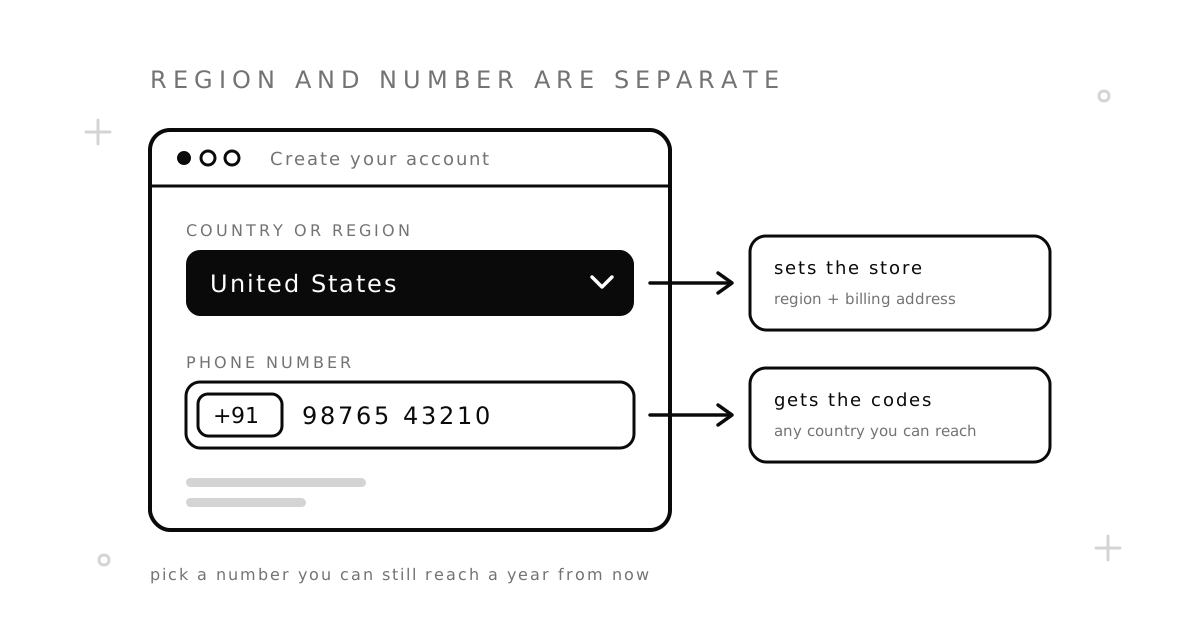
You do not need a US phone number for Apple ID or iCloud. Apple asks for a number you can always access, and it can come from almost any country. What makes the account American is the country or region you choose and your billing details, not the digits of your phone number.
Many guides say the opposite, usually on the way to selling you a number. This one follows Apple’s own help pages: what Apple asks for at sign-up, why the number still matters months later, and which kind of number is safe if you decide you want a US phone number for Apple ID anyway.
Key takeaways:
- The region and the phone number are two separate fields. A US account can have a number from India, Nigeria, Türkiye or anywhere else, except in mainland China.
- The number is not a one-time step. Apple sends sign-in codes to it later, each time you sign in on a new device or on the web.
- Your own number is the safest choice. A rented number is the next best, for as long as you keep renting it.
- Do not use a one-time number or a free public number for an Apple account you want to keep.
Do you need a US phone number for Apple ID?
No. Apple now calls the account an Apple Account, but most people still say Apple ID, so we use that name here. When you create one, every sign-up path asks you to pick a country or region. Separately, the web form asks for “a phone number that you can always access”. Nothing on Apple’s page says the two have to match.
The only country rule Apple names is mainland China, where “you might be required to provide a +86 phone number”. Everywhere else, the country code of your number is your business. So the usual search, “Apple ID US phone number”, starts from a wrong idea: an American account does not check for an American number.
What makes an Apple ID American: region, address, payment
Three things decide which App Store and which services you see:
- Country or region. You choose it when you create the account, and you can change it later.
- Billing address. This is what people mean when they search for an American Apple ID address. Apple asks for an address in the region you chose.
- Payment method. Apple says you “might need to enter a valid payment method for your new country or region” when you switch.
Apple also tells you what it expects. If you do not want to add a payment method, its help page suggests waiting until you are physically in the new country and creating the account there. In other words, the region is meant to be the place where you live. We do not give out addresses to copy, and you should use one that is really yours.
Can you create an Apple ID without a phone number?
Can I create an Apple ID without a phone number? Sometimes, but do not count on it. It depends on where you sign up:
| Where you sign up | What Apple’s page says |
|---|---|
| On an iPhone or iPad | “You might be asked to enter your phone number, or a payment method and billing information.” |
| On the web | “Enter your birthday and a phone number that you can always access”, then verify your email address and phone number. |
| In the App Store or on a Mac | You are asked to confirm your phone number. |
So the device path is the only one where the wording leaves room. Some users report that they could skip the step there, and others report that they could not. Apple does not promise a way to create an Apple ID without a phone number, and an Apple ID without a phone number has nowhere to receive sign-in codes except your other Apple devices.
Why the number matters after sign-up
The number you enter becomes a trusted phone number. Apple describes it as “a phone number that you’ve set up to receive two-factor authentication verification codes from Apple”. When you sign in on a new device or in a browser, Apple shows a six-digit code on a device you already use, or sends it to that number.
This is the part most guides leave out. If you have one Apple device and it is lost, broken or reset, the trusted number is your way back in. If the number is gone too, you are left with account recovery, and Apple warns that “this process could take a while — several days or more”.
Your photos, backups, purchases and iCloud mail all sit behind this account. Pick the number as carefully as you would for a bank.
USA number for iCloud: which kind is safe to use
If you still want a USA number for iCloud, for example because you have no stable number of your own, the type of number matters more than its country.
| Number | How long it is yours | For an Apple ID |
|---|---|---|
| Your own SIM, any country | As long as you keep the SIM | Best choice |
| Rented US number | For the term you pay for, from 12 hours up to 12 months, and you can renew | Reasonable, if you keep renewing or switch to your own number later |
| One-time number | Up to 20 minutes, for one code | Not recommended: the next code has nowhere to go |
| Free public number | Never yours | Never: anyone can read the code |
A one-time number is built for a single SMS. On SMSZ it is held for your order for up to 20 minutes, and after it closes it can be sold to someone else. That is fine for a sign-up you will never return to. It is a bad fit for an account that sends a code to the same number months later.
Free numbers are worse for this job. Our free US numbers have a public inbox, so every visitor sees every SMS. Whoever reads your Apple code can use it. Keep them for tests and throwaway sign-ups.
If you want a virtual number for Apple ID, the option that fits is to rent a number. A rented number receives SMS from any service for the whole term. You can try a number for Apple or browse US numbers, and the price is shown before you pay. Two honest limits: Apple may reject a virtual number, and the numbers receive SMS only, with no calls. A rental also ends when you stop renewing, so add a second trusted number as soon as you have one. Our guide on how to get a second phone number compares the longer-term options.
If Apple rejects the number
Sometimes the form refuses a number, or no code arrives. Some users who tried virtual numbers report the message “Your Apple Account cannot be created at this time”. Work through these in order:
- Check the format. Choose the right country in the list, then type the number without the leading zero you use at home.
- Use a mobile number. Internet-based numbers are refused more often. See VoIP vs. non-VoIP numbers for how services tell them apart.
- Try a number Apple has not seen. A number that is already attached to other accounts can be turned down.
- Wait before the next try. Many attempts in a row from one device or network look like abuse. Come back the next day.
- Sign up on an Apple device. That path asks for less than the web form.
The same checks apply on other services. We explain the error this phone number cannot be used for verification in a separate guide.
Common questions
Can I use a US phone number for Apple ID if I live in another country?
Yes. Apple accepts numbers from other countries, so a US phone number for Apple ID is allowed wherever you live. It is also not required. What matters is that you can still receive SMS on it a year from now.
Is a phone number for iCloud the same as the Apple ID number?
Yes. iCloud is part of your Apple account, so there is one set of trusted phone numbers for both. If you were looking for a phone number for iCloud to call Apple, that is a different thing: use the contact options on Apple’s support site.
Can I change the phone number on my Apple ID later?
Yes. You can add a new trusted number and remove the old one in the sign-in and security section of your account settings. Add the new number while the old one still receives codes, so you are never left without one.
Sources
Checked on November 13, 2026:
- Apple Support: How to create a new Apple Account — what each sign-up path asks for, and the +86 rule for mainland China.
- Apple Support: Two-factor authentication for Apple Account — codes sent to a trusted phone number (published August 13, 2026).
- Apple Support: If you forgot your password and can’t sign in — the definition of a trusted phone number and how long account recovery can take (published October 5, 2026).
- Apple Support: Change your Apple Account country or region — payment method and billing address for a new region (published October 30, 2026).
- Apple Support Community — user reports about sign-up errors and missing codes.


