How to Tell If a Number Is VoIP: 4 Free Ways to Check
Some apps accept a phone number without a second look. Others refuse it on sight, and the reason is almost always the same: the app decided the number is VoIP. If you want to know that before an app tells you — for a number you already have, one someone gave you, or one you are about to use — you can check it yourself, for free, in a few minutes.
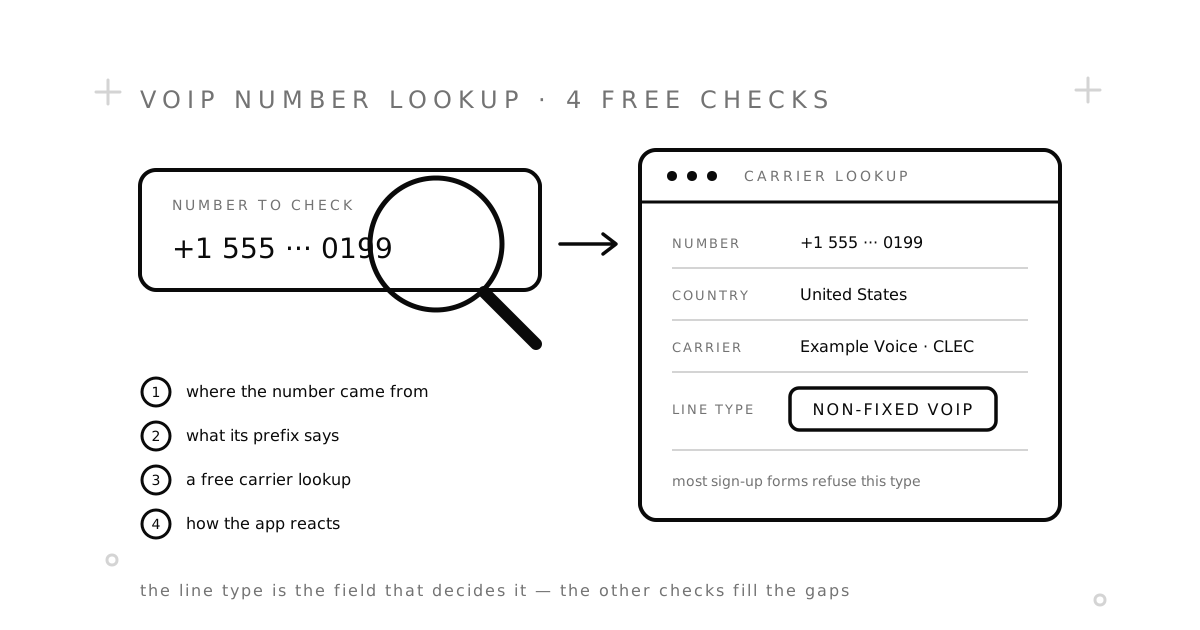
There are four ways to do it. They run from quickest to most reliable, and each one fills a gap the one before it leaves.
The short answer
- Check where the number came from. If an app or an online phone system gave it to you, it is almost certainly VoIP.
- Read the prefix. In many countries, mobile and VoIP numbers start with different digits. In the US and Canada they do not.
- Run a free carrier lookup. Paste the number into a lookup tool and read the line type. This is close to the check most apps run themselves.
- Watch how the app reacts. Every app uses its own data, so its answer is the final one.
What “VoIP” means in a lookup
A VoIP number carries calls and texts over the internet instead of a mobile network. Better lookup tools split it into two kinds, and the difference matters:
- Non-fixed VoIP — not tied to an address, usable from anywhere: Google Voice, TextNow, and most second-number apps. This is the kind sign-up forms refuse most often, because it is the easiest to get in bulk.
- Fixed VoIP — an internet phone line tied to a home or office address, like the landline that comes with a broadband package. Apps tend to treat it like a landline.
Our VoIP vs. non-VoIP guide explains why apps care. This guide is about checking.
Way 1: Check where the number came from
The fastest check needs no tool at all. Ask where the number lives:
- A second-number or calling app — Google Voice, TextNow, TextFree, Talkatone, Hushed, Burner and similar. They run over the internet, so their numbers are VoIP.
- A business phone system — RingCentral, Zoom Phone, Microsoft Teams calling, Vonage and the like. VoIP.
- A home phone from your internet provider — usually fixed VoIP.
- A SIM card or eSIM from a mobile carrier — a mobile number, including prepaid plans and smaller carriers that rent space on a big network.
- A virtual number from an SMS service — it depends on the provider. Some sell VoIP ranges, some sell mobile ones. SMSZ numbers are virtual, but they come from mobile ranges.
If you do not know where a number came from, move on to way 2.
Way 2: Read the number’s prefix
Outside the US and Canada, many countries give mobile, landline and internet numbers their own starting digits. Once you know the pattern, the number gives itself away.
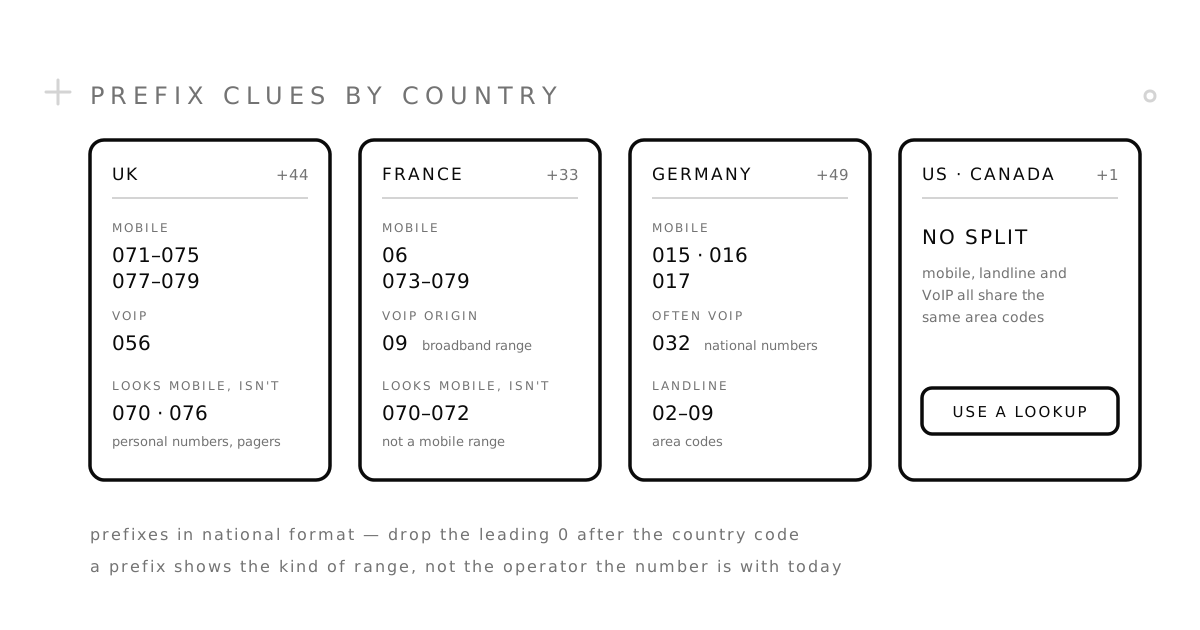
- UK (+44). Mobile numbers start 071–075 or 077–079. 056 is Ofcom’s range for “location independent” services — in practice, VoIP. Watch out for 070 (personal numbers that forward calls) and 076 (pagers, apart from 07624 on the Isle of Man): they start with 07 but are not mobile.
- France (+33). Mobile numbers start 06 or 073–079 — not every 07. The 09 range was opened for phone lines that run over broadband, so it is still a strong VoIP hint. Since 2023, though, 01–05 numbers are no longer tied to a region either, so a “landline-looking” French number can be VoIP too.
- Germany (+49). Mobile numbers start 015, 016 or 017. 032 is a national range with no link to any city, and it is widely used for VoIP.
- US and Canada (+1). No luck here. FCC rules stop area codes from being split by service or technology, so mobile, landline and VoIP numbers share the same area codes. The digits tell you nothing — go straight to way 3.
Two limits. The prefix shows the kind of range a number was issued from, not which operator runs it today. And these prefixes are written the way people dial them at home — in international format the leading 0 drops, so UK 07700 900123 becomes +44 7700 900123.
Way 3: Run a free carrier lookup
This is the check that matters most, because it is close to what apps do behind the scenes. It takes about two minutes.
- Write the number in international format. Plus sign, country code, then the number without its leading 0: +44 7700 900123, not 07700 900123.
- Paste it into a free lookup tool. For US numbers, PhoneCheckr and VeriRoute Intel show the line type without an account, and both look at the carrier the number is with today, not the one it started with. PhoneCheckr takes Canadian numbers too. For other countries, Abstract API’s free lookup takes numbers with any country code. Links to all of them are under Resources at the end.
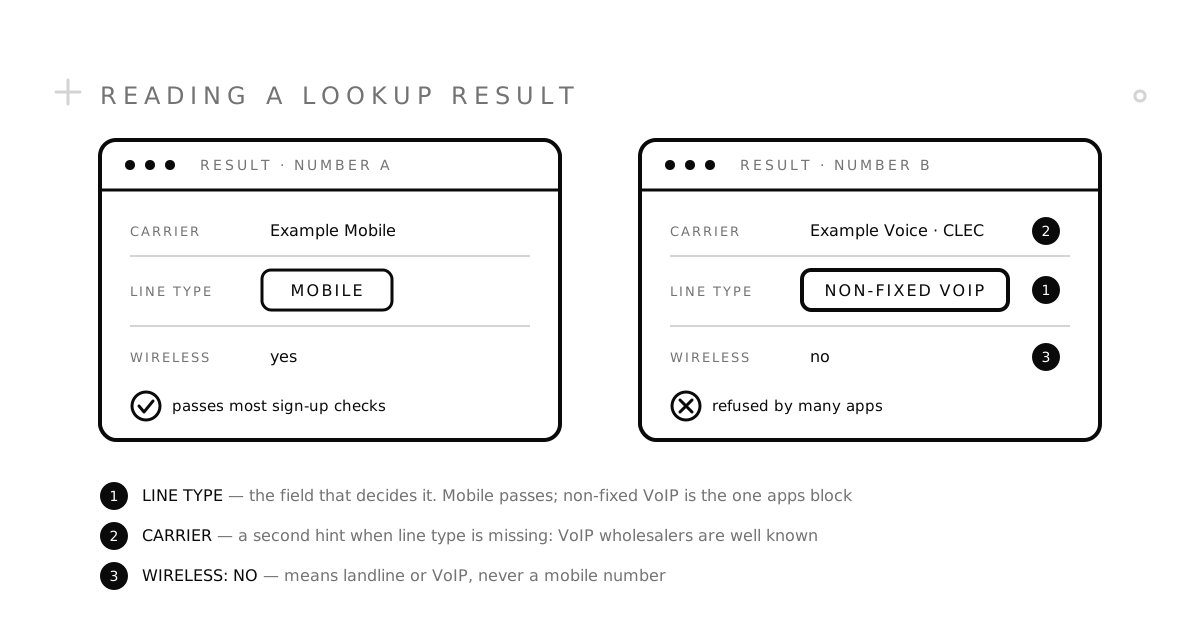
- Read the line type first. Mobile means most apps will accept it. Non-fixed VoIP means many will not. Fixed VoIP and landline sit in between: they can receive a code, but plenty of apps want a mobile number.
- Then read the carrier name. If the tool shows no line type, the carrier is the next best clue. A big mobile network’s name points to mobile. A name you do not recognise, often with “CLEC” after it, usually means a wholesale carrier that supplies numbers to VoIP apps. Many Google Voice numbers, for example, show up under Bandwidth, one of the carriers Google lists as a Voice provider.
Where free lookups fall short:
- Ported numbers. Some tools read who a block of numbers was first given to, not who runs a number today. Local Calling Guide works this way: it is handy for spotting VoIP wholesalers in a US area code, but a number moved from a mobile carrier to a VoIP service can still look mobile there, and the other way round.
- Different databases, different answers. Two tools can disagree. When they do, trust the one that shows a line type over one that shows only a carrier.
- Limits and captchas. Free tools cap how many lookups you can run. Fine for one number, not for a list.
Checking a list of numbers, or building the check into your own sign-up form? Developer APIs return the same data in bulk. Twilio’s Line Type Intelligence, for example, separates nonFixedVoip (its docs name Google Voice as an example) from fixedVoip, mobile and landline, and charges a small fee per lookup. Before you trust any API, make sure it can answer “VoIP” at all: some only offer mobile, landline and a few special types, so a VoIP number has to come back as something else.
Way 4: Watch how the app reacts
A lookup tells you what the databases say. The app you are signing up for has its own data and its own rules, so its reaction is the final answer. You will see one of three:
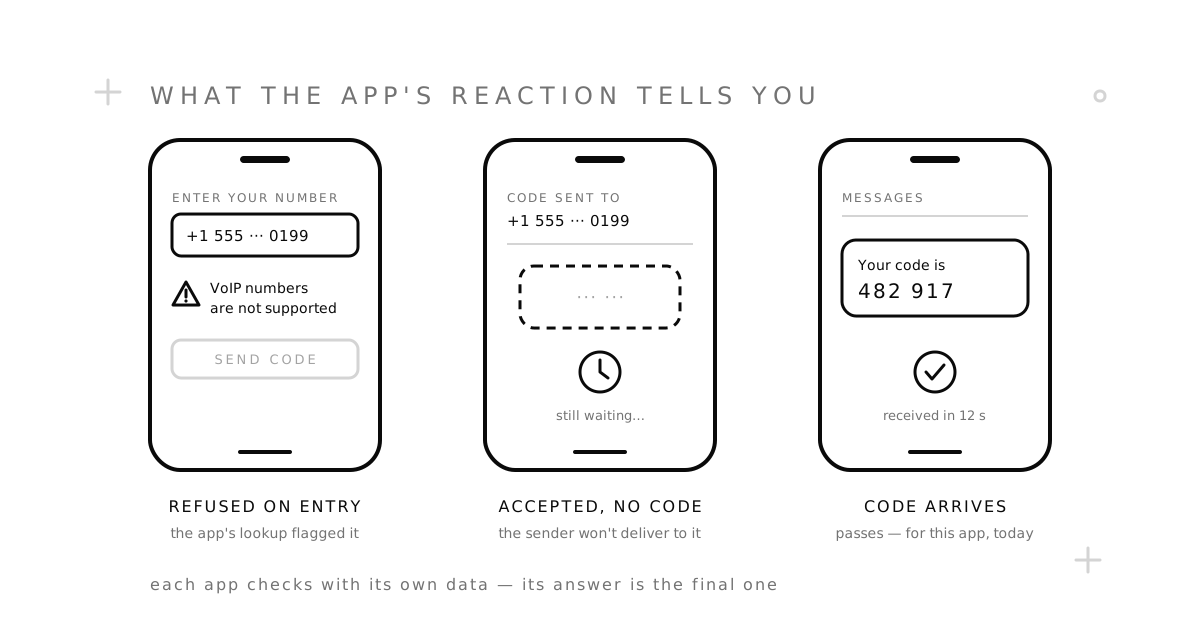
- Refused on entry. A message such as “VoIP numbers are not supported”, “Please enter a valid mobile number” or Google’s “This phone number cannot be used for verification” appears before any code is sent. The app’s own lookup flagged the range.
- Accepted, but no code arrives. The app took the number, but the text never lands. Some senders do not deliver to VoIP ranges at all — especially messages sent from short codes, the 5- and 6-digit numbers companies text from. Wait a few minutes, ask for one resend, then change numbers instead of retrying.
- The code arrives. The number passes — for this app, today. It says nothing about the next app, and a range that passes now can be flagged later.
Your number is VoIP. Now what?
- For calls and texts with people, keep it. VoIP is fine for talking.
- For a verification code, use a number on a mobile network. On SMSZ, pick the app you are verifying, then a country. The numbers come from mobile ranges, and if no code arrives the order cancels and your balance comes back under our refund policy.
- Skip free public numbers. They are shared with everyone and reused constantly, which gets their ranges flagged fast. Our free vs. paid comparison explains the trade-off.
Common questions
Can you tell if a number is VoIP just by looking at it?
Sometimes. In countries with separate ranges, like the UK, France and Germany, the prefix is a strong hint. In the US and Canada, no — you need a lookup.
Is a Google Voice number VoIP?
Yes. It runs over the internet and is not tied to a SIM card — Twilio’s lookup documentation uses it as its example of non-fixed VoIP — and many banks and sign-up forms refuse it for verification. Our Google Voice alternatives guide covers what to use instead.
Are free VoIP lookups accurate?
Mostly, for the line type. They can lag behind numbers that have been ported, and different tools use different databases. If the answer matters, check with two.
Is a virtual number the same as a VoIP number?
No. “Virtual” only means you use the number without a SIM card in your hand. The number itself can sit on a mobile network or on the internet.
Why did an app refuse a number my lookup called mobile?
The app may use a different, fresher database, or it may have flagged that range after seeing it used for many sign-ups. That is why the app’s reaction is the last check, not the first.
Need a number that is not VoIP? Pick a service and a country, or read how SMSZ works first.
Resources
Free lookup tools
- PhoneCheckr carrier lookup — US and Canada. Line type and current carrier, a few free lookups an hour.
- VeriRoute Intel phone lookup — US. Line type and whether the number has been ported, no sign-up.
- VoIPTest carrier lookup — US. Line type and port status; only a couple of free lookups every few days.
- Abstract API phone lookup — any country. Carrier and line type, with a daily free limit.
- Local Calling Guide prefix search — US and Canada. Shows which company holds each block of numbers.
For developers
- Line Type Intelligence (Twilio docs) — every line type the API returns, with examples.
Numbering plans
- The National Telephone Numbering Plan (Ofcom, PDF) — UK ranges, including 056 and the 07 split.
- La numérotation (Arcep, in French) — France’s mobile and 09 ranges.
- Mobile Dienste (0)15, (0)16, (0)17 and (0)32 Nationale Teilnehmerrufnummern (Bundesnetzagentur, in German) — Germany’s mobile and 032 ranges.
- Area Code Relief FAQs (NANPA, PDF) — why US and Canadian area codes are not split by technology.
Background
- Voice Over Internet Protocol (VoIP) (FCC) — a plain-English definition.
- Google Voice providers (Google Workspace) — the carriers behind Google Voice numbers.