Best SMSPVA Alternatives for Receiving SMS Codes Online
SMSPVA (often typed “SMS PVA”) has sold numbers for receiving verification codes since 2014. You top up a balance, choose an app and a country, and read the SMS in your dashboard. It also rents numbers for longer, has an Android app and a Telegram bot, and offers an API for developers.
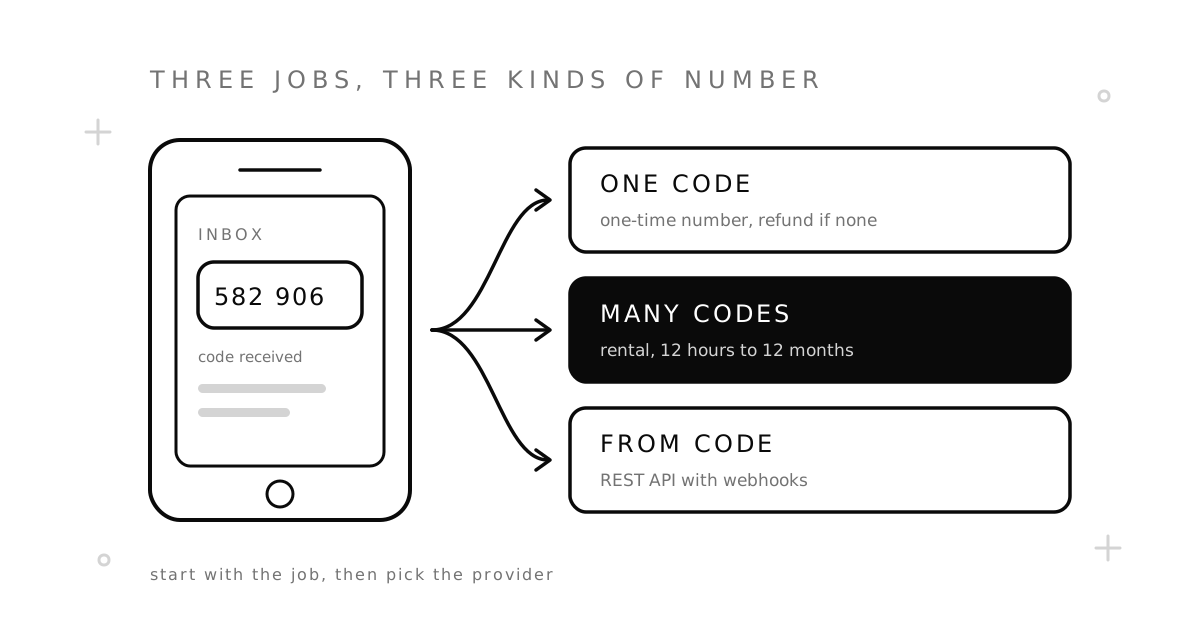
People look for an SMSPVA alternative for plain reasons. The country they need has no numbers today. A code keeps failing on one app. Or they want a number for longer than SMSPVA guarantees a rental. This guide gives SMSPVA a fair review, explains what its name and its two kinds of numbers mean, and compares seven ways to receive SMS codes online, sorted by the job you need done.
SMSPVA review: what it does well
Credit where it is due:
- A long track record. The site has been running since 2014. Its footer names the operator as Numberly Ltd., a company registered in the Marshall Islands.
- Two kinds of numbers. SMSPVA sells “both real SIM-based and virtual numbers”. Its rental page says physical SIM numbers give a higher success rate for codes, and virtual ones are there “for budget cases”.
- Many ways in. You can use the website, an Android app on Google Play or a Telegram bot. The site even offers to sell a number without registration.
- A serious API. Its developer docs describe a REST API with an API key in the request header, SDKs for Python, JavaScript, PHP, Go, C# and Java, a separate rental API and a local MCP server for AI tools.
If SMSPVA works for your apps and countries, you do not have to leave. Still, it is wise to keep a second provider ready for the day your country runs out of numbers.
What “PVA” means, and why it matters
PVA stands for phone verified account: an account on a website that has passed an SMS check. A “PVA phone number” is simply a number used to pass that check. The term comes from the trade in ready-made accounts, where sellers create accounts in bulk and verify each one with a different number.
For you, that history has one practical effect. Big platforms work hard to stop bulk sign-ups, so they watch number ranges that many accounts come from. A number that was verified many times before is more likely to be refused. That is a good reason to pick a provider that does not hand the same number to many people for the same app.
To be clear: creating accounts in bulk, or to get around a ban, breaks the rules of almost every platform. The options below are for normal use — your own sign-ups, a second account for work, or a test.
Why people look for an SMSPVA alternative
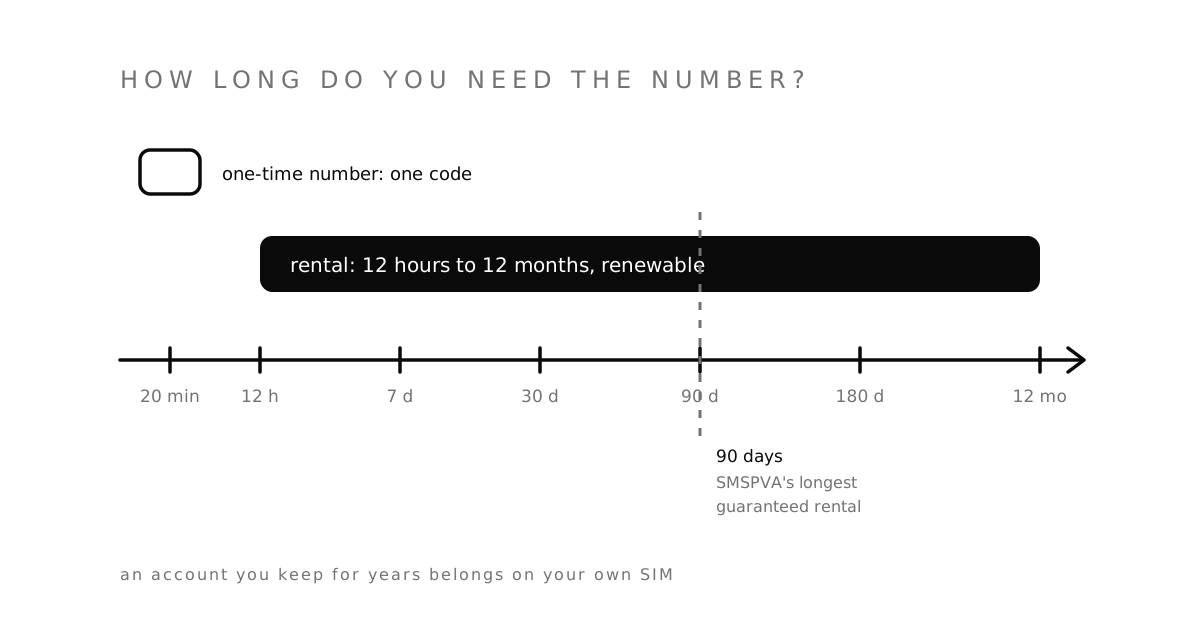
- Rentals have a ceiling. The rental page says the maximum guarantee period for a rent is 90 days. You can extend a number only when fewer than 7 days are left. If you need a number for half a year, plan for that limit.
- Some rentals do not get every SMS. The same page says rental numbers do not work with messages from mobile operators and banks, and that “some messages may be blocked by our system”.
- Refunds are decided case by case. For rentals, SMSPVA says it does not refund a number that received SMS without problems, and that most other cases are “decided individually”.
- The headline price is not the price you pay. The homepage says “from $0.05 per number”, but prices depend on the country and the app. On the day we checked, a US number started at $0.65.
Real SIM or virtual number: what the label changes
A “real SIM” number sits on a physical SIM card in a mobile network. A virtual number lives on internet phone systems (VoIP). Some apps check the type of number before they send a code, and refuse VoIP ranges on sight. That is why people search for a non VoIP number for SMS verification.
The label matters most for strict apps: banks, some marketplaces and some messengers. Many other apps do not check at all, and a cheaper number works fine. When a provider sells both kinds, read the order page before you pay, so you know which one you are buying. Our guide to VoIP vs. non-VoIP numbers explains the difference, and this one shows how to check a number yourself.
7 SMSPVA alternatives, sorted by the job
1. SMSZ one-time numbers — one code, refund without a ticket
Choose a service and a country and you see the price before you pay. The number is yours for up to 20 minutes, and the code appears in your account, usually within one to three minutes. If no SMS arrives in that time, the order cancels and the money returns to your balance by itself. You do not have to write to support. SMSZ sells numbers from 130+ countries for 1,000+ services, and you sign up with an email address only.
Best for: one sign-up and one code.
2. SMSZ rentals — when 90 days is too short
A rental keeps one private number for you and shows every SMS it receives, from any app. Terms run from 12 hours to 12 months in 70+ countries, and you can renew. Auto-renew is off unless you turn it on; then it renews for the same term from your balance. Open the “Rent Number” tab on the home page to see the countries and terms on offer today.
Why rent at all? Many accounts ask for a code again — on a new device, after a password change, or when they look at a login and do not like it. A one-time number is closed after your order, and it can go to someone else later. A rental stays yours for the whole term.
Best for: accounts that will ask for a code again.
3. The SMSZ API and MCP server — for code that orders numbers
If you use the SMSPVA API, the SMSZ API covers the same ground with plain REST and JSON. You order a number with POST /activations, rent one with POST /rentals, and set a webhook, so the code is sent to your server when it arrives instead of you asking for it again and again. API keys have their own permission scopes, and an Idempotency-Key header stops a retry from buying a second number. For AI assistants there is an MCP server.
The two APIs are not the same protocol, so you will change your client code. Move one flow at a time and keep the old one running until the new one has worked for a week.
Best for: bots, test scripts and internal tools.
4. 1001SMS — a second balance for empty countries
1001SMS sells numbers for one code and rentals in popular countries. Stock moves every day at every provider. A few dollars on a second site means that when one has no numbers for your app, you can try the other in a minute instead of waiting.
Best for: a backup when your usual country is sold out.
5. SMSZ free numbers — a free first test
Want to know whether an app sends codes to virtual numbers at all, before you spend anything? Try the free numbers. They are public: every SMS shows on an open page, so anyone can read it. Use them for a quick test, never for an account you want to keep.
Best for: checking an app at zero cost.
6. Other SMS activation sites
SMSPVA is one of many paid marketplaces that work the same way. We compared several of them in our guides to SMS-Man, OnlineSim, HeroSMS and 5SIM alternatives. Each one has different countries in stock and different refund rules, so compare the two or three that fit your apps.
Best for: a wider choice of countries and prices.
7. A carrier SIM or eSIM
For your bank, your main email and any account with money in it, use a number you will own for years. A prepaid SIM or an eSIM from a mobile carrier passes almost every check. It costs a monthly plan, and in many countries you must show ID. See virtual number vs. second SIM for the full comparison.
Best for: accounts you never want to lose.
SMSPVA vs. the alternatives at a glance
| Option | Longest term | If no code arrives | Best for |
|---|---|---|---|
| SMSPVA activation | One code | Check its refund policy | One code, real SIM or virtual |
| SMSPVA rental | 90 days guaranteed | Decided case by case | Repeat codes for up to three months |
| SMSZ one-time | One code, up to 20 minutes | Money back to your balance by itself | One sign-up |
| SMSZ rental | 12 months, renewable | See the refund policy | Repeat codes on one number |
| 1001SMS | One code or a rental | Check its rules | A second balance |
| SMSZ free numbers | Until the number is rotated | Nothing to refund | A free test |
| Carrier SIM / eSIM | Years | Not an issue | Accounts you keep |
How to move from SMSPVA without losing money
- Use up your balance first. Spend what is left on SMSPVA before you move, or keep it there as your backup.
- Top up a small amount. Put the minimum on the new provider. Do not move your whole budget on day one.
- Run one real order. Use the app and country you need most. Check how long the code takes and how the dashboard shows it.
- Watch a failed order. When a code does not arrive, see what happens to your money. On SMSZ it should be back on your balance with no message to support.
- Move rentals last. Before an SMSPVA rental ends, rent a new number and add it to each account, then remove the old one while you can still receive SMS on it.
Questions people ask
Is SMSPVA legit?
Yes, it is a real, long-running service with a named operator, published terms and a public API. Read its refund and delivery policies before a large top-up. Figures on the homepage, such as delivery speed and success rate, are its own claims.
Is SMSPVA free?
No. Activations and rentals are paid from your balance. SMSPVA links to a free numbers page, but free public numbers on any site are shared, and anyone can read the codes. If you want a free test, the SMSZ free numbers work the same way and carry the same warning.
Does SMSZ have an app like SMSPVA?
No. SMSZ works in any browser, on a phone too, and you can add it to your home screen from the browser menu. Developers can use the API or the MCP server instead of an app.
What is a PVA phone number?
It is a number used to pass the SMS check when you create an account. Any number that receives the code can do it; the real question is whether the app accepts that number type and whether you will need the number again later.
Can I get a refund from SMSPVA?
SMSPVA publishes a refund policy as a PDF on its site. For rentals, its rental page says refunds are not given for numbers that worked and that other cases are decided one by one. Keep your order IDs and screenshots if you plan to ask.
Which SMSPVA alternative is cheapest?
It depends on the app and the country, and prices change every day. Compare the live price for your exact app and country, and choose a provider that refunds a failed order: a cheap number that fails three times is not cheap. Our JuicySMS alternatives guide shows how to work out the real cost of one code.
Ready to try? Pick a service or a country, or read how SMSZ works first. The refund rules are in our Payment & Refund Policy.
Sources
SMSPVA’s own pages, checked on November 3, 2026:
- Homepage — real SIM and virtual numbers, “from $0.05”, country prices, the app and the operator named in the footer.
- Rent numbers — the 90-day guarantee, the 7-day extension window, banks and operators, and rental refunds.
- Developer docs — the REST API, SDKs, rental API and MCP server.


