Telegram Not Sending Code? 7 Reasons and Fixes
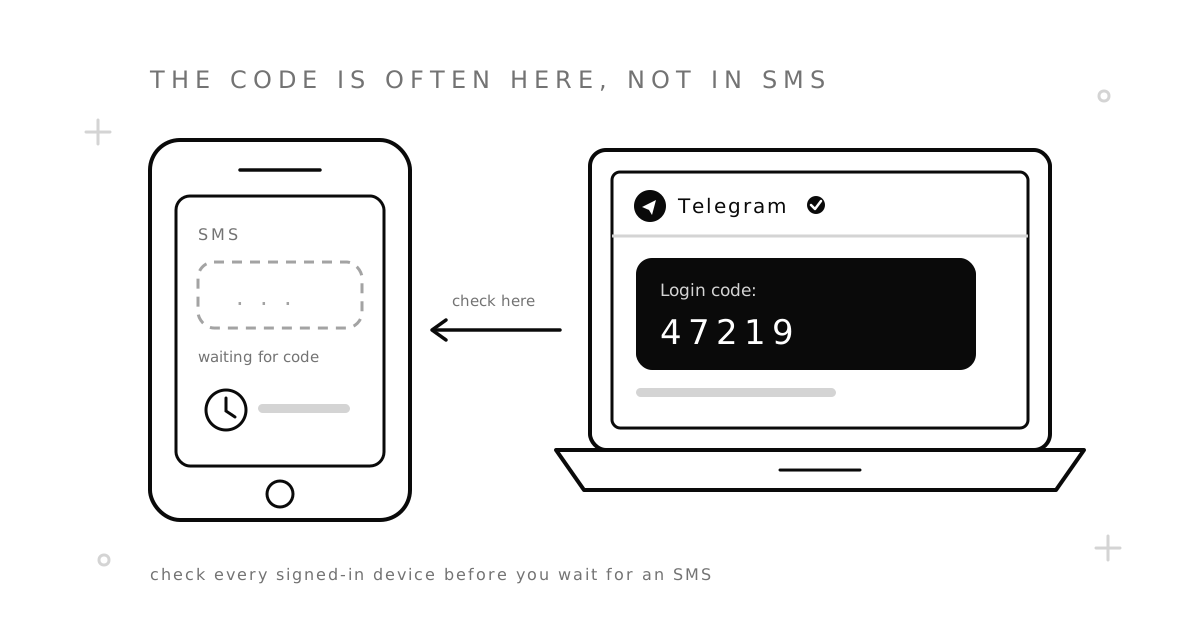
Telegram not sending code? Open Telegram on your other devices first. When you are signed in anywhere else, Telegram usually sends the login code there, to a chat named “Telegram”, instead of by SMS. No other device? Check the number, wait out the limits, and work through the fixes below.
When Telegram is not sending code, most of the time nothing is broken. Telegram simply chose a different way to deliver the code, and the SMS you are waiting for was never sent. Below are the seven usual reasons, in the order worth checking, and what to do about each one.
Key takeaways:
- Look in the “Telegram” chat on any phone, tablet or computer where you are still signed in. Most login codes go there.
- Signing in on a computer? Desktop and web logins do not send SMS. The code goes to the Telegram app on your phone.
- Too many requests lock you out for a while. Stop asking for new codes and come back later.
- If your number will not get a code at all, you can open an account on another number: a free shared one to try, or a private one for an account you want to keep.
1. The code went to your Telegram app, not to SMS
Telegram’s own FAQ says it “may send the login code via Telegram instead of SMS”, and that to get it you should “just check Telegram from any of your connected devices”. The code arrives in a verified service chat named “Telegram”. This is the most common cause of a “Telegram code not received” problem.
So before you wait for an SMS, check every device you have used: an old phone, a tablet, a work laptop, the web version in a browser. The login screen usually says where the code went. Read that line first.
One rule that matters: never share this code. Telegram will not ask you for it, and anyone who has it can sign in to your account.
2. You are signing in on Telegram Desktop or the web
When a user reported missing codes on Telegram’s bug tracker, a member of the Telegram team replied that logins to “Telegram Desktop and Web apps don’t send SMS”. The code goes to the Telegram app on your phone instead. That is why the Telegram code SMS is not received when you sign in on a computer: none was sent.
If your phone is signed in, take the code from there. Or skip the code: on the computer, choose the QR code login, then on your phone open Settings, then Devices, then Link Desktop Device, and scan the code on the screen. If your phone is not signed in, sign in on the phone first.
3. You asked for the code too many times
Every new request counts: pressing “resend”, typing a wrong code, reinstalling the app. After several, Telegram stops sending codes for a while and shows a “too many attempts” message. Then the Telegram code is not sending at all, however long you wait on that screen.
Stop requesting. Each extra try can make the wait longer. Do not reinstall the app or switch between numbers. Come back after several hours, and if it still fails, the next day.
4. Telegram asks you to pay before it sends the SMS
In some countries, users have reported that Telegram asks them to buy a short Premium subscription before it sends an SMS code to a new device. In November 2025, users in Kenya described this prompt, and some said the login still failed after they paid.
Before you pay, try the free routes: the code inside the app on another device, or a QR login from a phone that is still signed in.
You may also get your code from an unknown personal number. Telegram runs a Peer-to-Peer Login program in which volunteers let their phones send other people’s login codes in exchange for Premium. That is expected. Still, never send the code back to anyone.
5. Your carrier or phone blocks the message
If Telegram is sending the SMS but your phone is not receiving the code, the problem is usually on your side of the network:
- No signal or roaming. Abroad, some SIM cards get SMS late or not at all. Try again on a stable network.
- Filters. Some carriers filter messages from foreign or unknown senders, and your phone may hide them in a spam or “unknown senders” folder. Check there.
- Blocked sender. If you once blocked a short number, its messages stay blocked.
- Full storage. A full message inbox can stop new SMS.
- Two SIMs or an eSIM. The SMS goes to the line the number belongs to. Make sure that line is on and can receive SMS.
A phone call is another way Telegram can send the code, but its FAQ says codes by phone call “may be unavailable for particular carriers”.
6. The number is new to Telegram, recycled or flagged
When you create a new account, there is no other device to send the code to, so Telegram must use SMS or a call. This is where most cases of “Telegram activation code not received” come from. Some numbers have trouble:
- Landlines. Telegram’s FAQ says accounts “can only be connected to a mobile number”.
- Used numbers. A number that someone else used for Telegram, and that was banned, may not get codes.
- Virtual and shared numbers. Apps often treat these ranges with suspicion. Our guide to VoIP vs. non-VoIP numbers explains what they check.
7. A typo in the number or country code
Telegram asks you to enter your number in the international format. Pick the right country in the list, then type the number without the leading zero you use at home: a UK number is +44 7700 900123, not +44 07700 900123. A wrong digit is a common reason a Telegram verification code is not received, and the app cannot tell you that the number belongs to someone else.
Stop depending on SMS codes
Once you are back in, set things up so that the next time Telegram is not sending code by SMS, it does not matter:
- Add a passkey. Telegram’s FAQ says you can “set up a Passkey to log in without an SMS code at all”, with your device’s PIN, fingerprint or face scan.
- Turn on Two-Step Verification. Then a login needs both the code and your password, so a stolen code alone is not enough.
- Stay signed in on two devices. New login codes will then reach you inside the app.
Telegram not sending code at all? Ways to sign up without your own SIM
Sometimes your own number simply will not get a code for a new account. Then you can register on a different number. Each option has a limit, so pick by what the account is for:
- Free shared numbers. Our free numbers for Telegram cost nothing and need no sign-up. You can try one, but the inbox is public: anyone can read the code and sign in to the account. Telegram also often rejects these numbers, because someone has already used them. Use them only for an account you do not mind losing.
- A private one-time number. A virtual number for Telegram is yours alone. The price is shown before you buy, the number is held for you for up to 20 minutes, and if no SMS arrives, the money goes back to your balance automatically.
- A rented number. Telegram asks for a code again each time you sign in on a new device. For an account you want to keep, rent a number for 12 hours up to 12 months, so the code can still reach you later.
- Telegram’s own anonymous numbers. Fragment, a platform linked to Telegram, sells +888 numbers for TON. They work only for signing up to Telegram and cannot receive SMS or calls.
Our step-by-step guide shows how to verify Telegram without your personal number, including the settings to change right after sign-up.
Common questions
Why is Telegram not sending code by SMS?
Usually because it sent the code to the Telegram app on another of your devices, or because you are signing in on a computer, where SMS is not used. Check the “Telegram” chat on every device first. If you have no other device, look at rate limits, your carrier and the number format.
How long should I wait after “too many attempts”?
Telegram does not publish an exact time. Stop requesting codes, then try again after several hours. If it still fails, wait until the next day. New requests in the meantime only make it longer.
Can I log in to Telegram without the SMS code?
Yes, in three ways: with the code that arrives inside the app on another device, with a QR code from a phone that is signed in, or with a passkey if you set one up earlier.
Sources
Checked on November 9, 2026:
- Telegram FAQ — codes sent via Telegram, phone-call codes and carriers, the international format, mobile numbers only, passkeys and Two-Step Verification.
- Telegram bug tracker — a Telegram team reply (August 12, 2021) that Desktop and Web logins do not send SMS.
- Tech-ish, November 27, 2025 — users in Kenya asked to buy Premium before an SMS code.
- Telegram Peer-to-Peer Login terms — volunteers sending login codes in exchange for Premium.
- TechCrunch, December 7, 2022 — Fragment’s anonymous +888 numbers.


